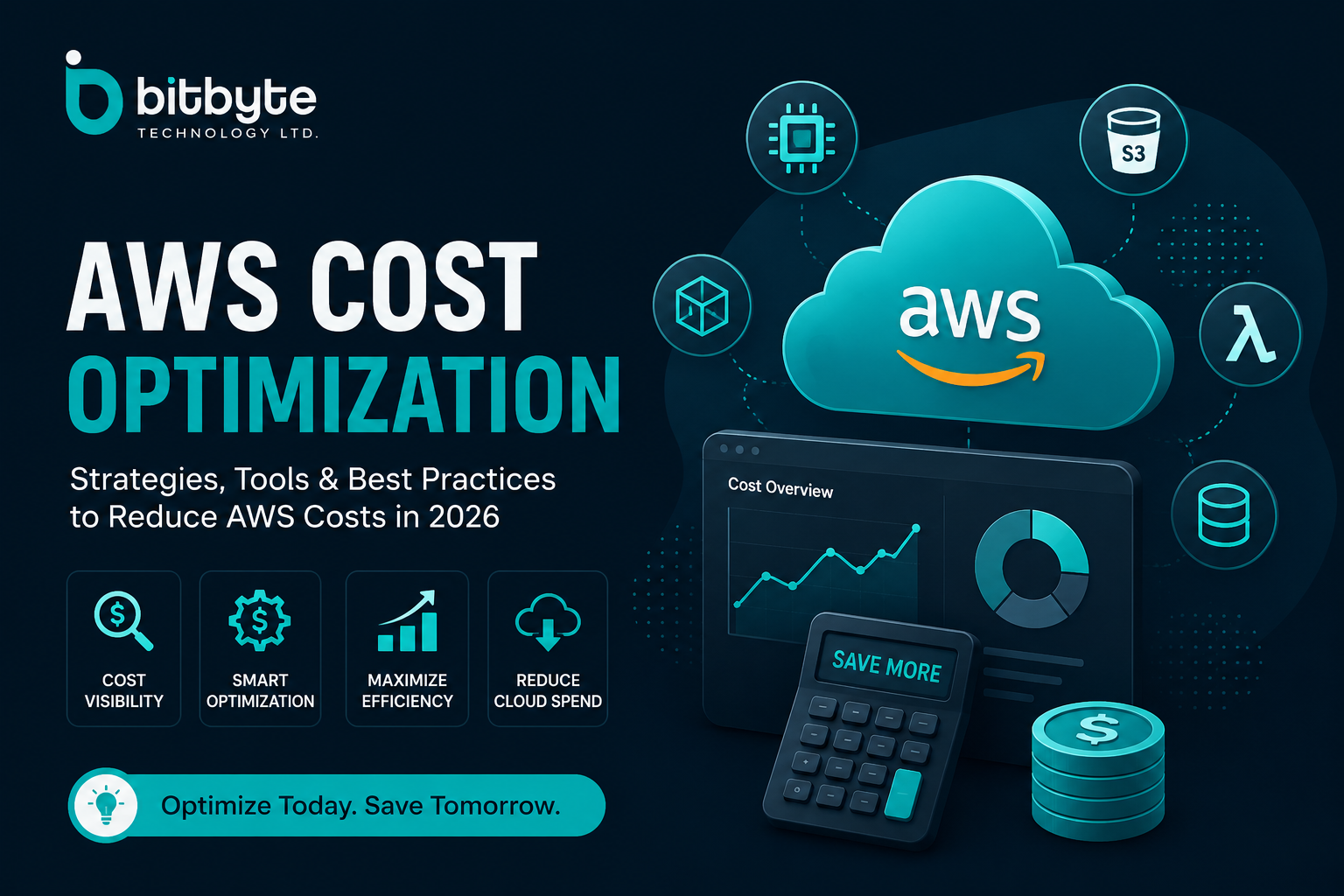
AWS Cost Optimization Guide 2026: Reduce AWS Costs Without Sacrificing Performance
Cloud computing has transformed how businesses build, deploy, and scale applications. Among all cloud providers, Amazon Web Services (AWS) remains the leading choice for startups, enterprises, and SaaS companies because of its extensive portfolio of services, global infrastructure, and pay-as-you-go pricing model.
However, while AWS offers incredible flexibility, many organizations struggle with one critical challenge—controlling cloud spending. Unused resources, oversized instances, inefficient storage, poor workload planning, and lack of governance often result in unexpectedly high monthly bills.
That’s where AWS cost optimization becomes essential.
Whether you’re managing a small application, an enterprise platform, or a large-scale SaaS product, optimizing AWS costs helps you maximize performance while minimizing unnecessary expenses. Instead of simply reducing costs, effective optimization ensures every dollar spent contributes measurable business value.
In this comprehensive guide, you’ll learn:
- How AWS pricing actually works
- How to estimate your infrastructure costs accurately
- How to use the AWS Cost Calculator and AWS Cost Estimator
- The cost structure of EC2, S3, Lambda, RDS, Aurora, Route 53, and other AWS services
- Proven AWS cost optimization best practices
- AWS cost management tools every organization should use
- Advanced strategies used by FinOps teams to reduce cloud spending
By the end of this guide, you’ll have a practical framework for building a scalable, cost-efficient AWS environment in 2026 and beyond.
What Is AWS Cost Optimization?
AWS cost optimization is the process of reducing unnecessary cloud expenses while maintaining or improving application performance, reliability, security, and scalability.
Rather than simply spending less, cost optimization focuses on allocating cloud resources efficiently so that infrastructure aligns with actual business demand.
For example, instead of running oversized EC2 instances 24/7, businesses can:
- Right-size compute resources
- Use Auto Scaling
- Purchase Savings Plans
- Leverage Spot Instances
- Archive infrequently accessed data to lower-cost storage classes
- Continuously monitor usage through AWS Cost Management tools
This approach helps organizations lower operational costs without affecting user experience.
Why AWS Costs Increase So Quickly
AWS follows a consumption-based pricing model. Every virtual server, database, storage bucket, API request, network transfer, and monitoring service contributes to your monthly bill.
Cloud costs often grow because of:
- Idle EC2 instances
- Overprovisioned virtual machines
- Excessive data transfer
- Unused Elastic IP addresses
- Forgotten EBS volumes
- Duplicate snapshots
- Poor storage lifecycle management
- Always-on development environments
- Inefficient Lambda execution
- Misconfigured databases
- Lack of resource tagging
- Multiple AWS accounts without centralized governance
Without continuous monitoring, these costs compound over time.
Understanding How AWS Pricing Works
Before discussing optimization strategies, it’s important to understand how AWS pricing is structured.
AWS pricing isn’t a single fee. Instead, your bill consists of charges from multiple services across compute, storage, networking, databases, analytics, monitoring, security, and developer tools.
The total AWS cost depends on several factors:
- Compute resources
- Storage consumption
- Database usage
- Network traffic
- API requests
- Monitoring services
- Backup and snapshots
- Geographic AWS Region
- Pricing model
- Resource utilization
For example, two companies running the same application can receive significantly different AWS bills simply because one uses Reserved Instances and S3 lifecycle policies while the other relies entirely on On-Demand resources.
Major Components of AWS Cost
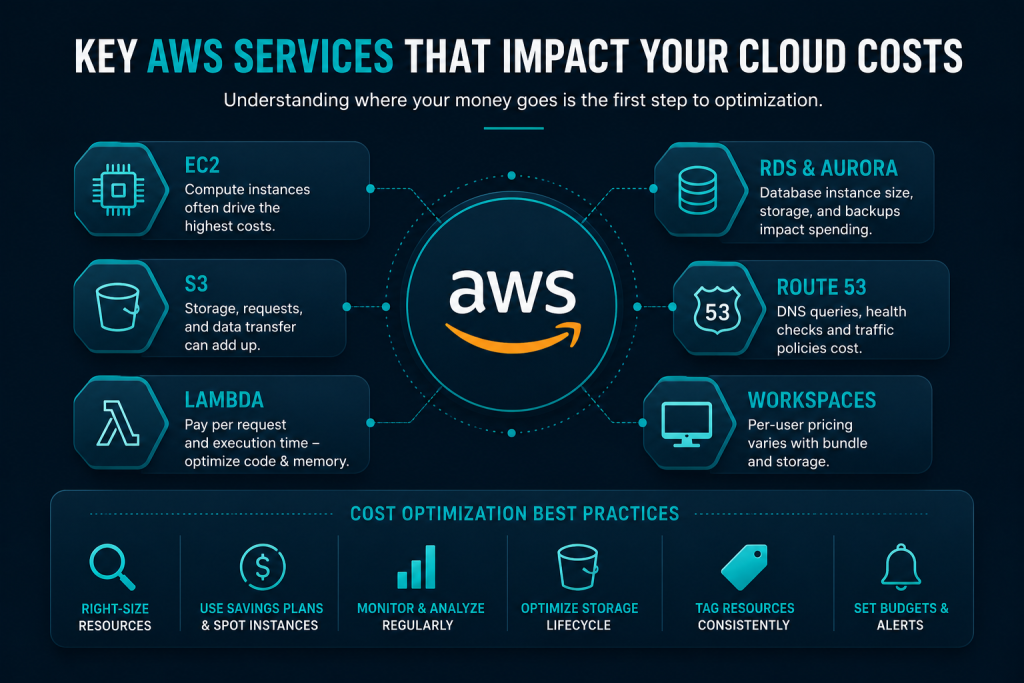
Compute Costs
Compute services typically account for the largest portion of cloud spending.
Examples include:
- Amazon EC2
- AWS Lambda
- Amazon ECS
- Amazon EKS
- AWS Fargate
- AWS Batch
Compute pricing depends on:
- Instance type
- vCPU
- Memory
- Operating system
- Region
- Runtime duration
- Instance purchasing option
Storage Costs
Storage charges vary depending on:
- Storage class
- Capacity
- Request frequency
- Data retrieval
- Replication
- Lifecycle policies
Major storage services include:
- Amazon S3
- Amazon EBS
- Amazon EFS
- Amazon Glacier
- S3 Glacier Deep Archive
Database Costs
Managed databases simplify operations but also contribute significantly to monthly AWS spending.
Popular services include:
- Amazon RDS
- Amazon Aurora
- DynamoDB
- Amazon ElastiCache
- Amazon Redshift
Pricing depends on:
- Instance size
- Storage
- IOPS
- Backup retention
- Multi-AZ deployment
- Read replicas
Networking Costs
Networking charges are often overlooked.
Common examples include:
- Data transfer
- NAT Gateway
- Elastic Load Balancer
- CloudFront
- Route 53
- VPC Endpoints
- Public IP addresses
Many organizations discover networking accounts for 20–40% of their AWS bill.
Monitoring and Management
Operational visibility also incurs costs through services like:
- Amazon CloudWatch
- AWS Config
- AWS CloudTrail
- AWS X-Ray
- Systems Manager
Monitoring is essential but should also be optimized.
How Much Does AWS Cost?
The answer depends entirely on your architecture. A small marketing website might cost less than $20 per month, while a high-traffic SaaS platform with global users, multiple databases, Kubernetes clusters, content delivery, analytics, and AI workloads can cost tens of thousands of dollars monthly.
Typical factors influencing AWS cost include:
- Number of users
- Traffic volume
- Compute requirements
- Storage usage
- Database size
- Geographic Regions
- Availability requirements
- Security controls
- Backup strategy
- Disaster recovery architecture
Because every workload is different, AWS provides pricing tools that estimate infrastructure costs before deployment.
AWS Cost Calculator: Estimate Your Cloud Spending Before Deployment
One of the smartest ways to avoid budget overruns is to estimate infrastructure costs before building your application.
The AWS Cost Calculator (officially known as the AWS Pricing Calculator) allows businesses to estimate the monthly cost of AWS services based on their planned architecture.
Instead of guessing cloud expenses, you can model workloads using expected compute, storage, networking, and database requirements.
The calculator supports hundreds of AWS services, including:
- Amazon EC2
- Amazon S3
- Amazon RDS
- AWS Lambda
- Amazon Aurora
- Amazon ECS
- Amazon EKS
- CloudFront
- Route 53
- DynamoDB
Benefits of Using the AWS Cost Calculator
- Forecast monthly AWS costs
- Compare pricing across AWS Regions
- Evaluate different instance types
- Estimate storage costs
- Calculate database expenses
- Plan budgets before deployment
- Share estimates with stakeholders
- Compare Reserved Instances and On-Demand pricing
For organizations planning digital transformation projects, using the AWS Cost Calculator early in the architecture phase helps prevent expensive surprises after launch.
AWS Cost Estimator vs AWS Cost Calculator
Many people search for AWS Cost Estimator and AWS Cost Calculator interchangeably.
Although they refer to the same general purpose—forecasting cloud expenses—they are often used in slightly different contexts.
| AWS Cost Calculator | AWS Cost Estimator |
|---|---|
| Official AWS pricing tool | Generic term used by businesses |
| Estimates infrastructure pricing | Estimates overall cloud spending |
| Supports detailed service configuration | May include third-party estimation tools |
| Used before deployment | Used during planning and budgeting |
Regardless of the terminology, both help organizations understand the expected cost of AWS before provisioning infrastructure.
Key Factors That Affect AWS Pricing Estimates
To generate accurate estimates, consider:
- Expected monthly users
- Average CPU utilization
- Peak traffic
- Storage growth
- Data transfer
- Backup retention
- High availability requirements
- Disaster recovery
- Auto Scaling configuration
- Reserved capacity
- Geographic deployment
Accurate forecasting improves budgeting and reduces the likelihood of unexpected cloud expenses.
AWS EC2 Cost: Understanding Compute Pricing
Amazon EC2 (Elastic Compute Cloud) is the backbone of many AWS workloads. Whether you’re hosting websites, running APIs, deploying enterprise software, or powering machine learning applications, EC2 often represents the largest percentage of your AWS bill.
That’s why optimizing AWS EC2 cost is usually the fastest way to reduce overall cloud spending.
How EC2 Pricing Works
AWS charges for EC2 based on several variables:
- Instance family (General Purpose, Compute Optimized, Memory Optimized, Storage Optimized, GPU)
- Instance size (vCPU and memory)
- Operating system
- AWS Region
- Storage volumes (Amazon EBS)
- Data transfer
- Licensing
- Purchase option
Even two identical instances can have different pricing depending on where they’re deployed and how they’re purchased.
EC2 Pricing Models
On-Demand Instances
Ideal for:
- Development
- Testing
- Short-term workloads
- Unpredictable traffic
Advantages:
- No upfront commitment
- Maximum flexibility
- Pay only for actual usage
Disadvantages:
- Highest hourly cost
Reserved Instances (RI)
Reserved Instances offer significant discounts in exchange for one- or three-year commitments.
Best for:
- Production applications
- Stable workloads
- Predictable usage
Potential savings:
Up to 72% compared to On-Demand pricing.
Savings Plans
Savings Plans provide pricing flexibility while still delivering substantial discounts.
Benefits include:
- Automatic application across eligible services
- Lower commitment risk
- Works across EC2, Lambda, and Fargate
Many organizations now prefer Savings Plans over Reserved Instances because of their flexibility.
Spot Instances
Spot Instances use AWS’s spare compute capacity.
Ideal workloads include:
- Batch processing
- Rendering
- CI/CD pipelines
- Big data processing
- Machine learning training
Potential savings:
Up to 90% compared to On-Demand pricing.
The trade-off is that AWS may reclaim Spot Instances with short notice, making them unsuitable for mission-critical applications unless fault tolerance is built into the architecture.
AWS EC2 Cost Optimization Best Practices
To reduce AWS EC2 cost:
- Right-size oversized instances
- Remove idle instances
- Enable Auto Scaling
- Use Savings Plans
- Purchase Reserved Instances for stable workloads
- Leverage Spot Instances
- Schedule development environments to shut down automatically
- Use Graviton instances where supported
- Monitor CPU and memory utilization
- Review Compute Optimizer recommendations
Organizations that regularly review EC2 usage often discover underutilized instances running at less than 10% utilization.
AWS S3 Cost Explained
Amazon S3 is one of the most widely used object storage services in the cloud.
Although storage appears inexpensive initially, AWS S3 cost can grow rapidly due to:
- Large data volumes
- Frequent API requests
- Cross-region replication
- Data retrieval
- Storage inefficiencies
Understanding the pricing model is essential for controlling long-term cloud costs.
What Determines AWS S3 Cost?
S3 pricing depends on:
- Storage class
- Storage volume
- PUT requests
- GET requests
- Lifecycle transitions
- Data transfer
- Replication
- Object monitoring
Unlike traditional storage systems, AWS bills for more than just stored data.
AWS S3 Storage Classes
Choosing the right storage class has a major impact on AWS S3 storage cost.
S3 Standard
Best for:
- Frequently accessed files
- Websites
- Applications
- Static assets
S3 Intelligent-Tiering
Automatically moves data between access tiers based on usage.
Ideal for:
- Unknown access patterns
- Dynamic workloads
S3 Standard-IA
Suitable for:
- Backup files
- Long-term storage
- Disaster recovery
Lower storage costs but retrieval fees apply.
S3 Glacier Instant Retrieval
Designed for archival data that still requires fast access.
S3 Glacier Flexible Retrieval
Optimized for:
- Compliance
- Long-term archives
- Infrequently accessed data
S3 Glacier Deep Archive
The lowest-cost storage option for data retained over many years.
Suitable for:
- Regulatory archives
- Historical records
- Disaster recovery backups
AWS S3 Cost Optimization Strategies
To reduce AWS S3 costs:
- Enable lifecycle policies
- Archive inactive data
- Delete obsolete objects
- Remove incomplete multipart uploads
- Compress large files
- Deduplicate data
- Enable Intelligent-Tiering
- Review bucket analytics
- Reduce unnecessary replication
- Optimize object sizes
Lifecycle automation alone can significantly lower storage costs over time by moving cold data into lower-cost storage classes.
Cost of AWS Lambda
AWS Lambda enables serverless computing, allowing developers to run code without managing infrastructure.
While Lambda eliminates idle server costs, inefficient function design can increase the cost of Lambda AWS deployments.
Lambda Pricing Factors
Pricing depends on:
- Number of requests
- Execution duration
- Allocated memory
- CPU allocation
- Provisioned concurrency
- Architecture (x86 vs Graviton)
Small inefficiencies multiplied across millions of invocations can substantially increase monthly costs.
Lambda Cost Optimization
Best practices include:
- Reduce execution time
- Optimize code efficiency
- Increase memory only when necessary
- Reuse execution environments
- Minimize cold starts
- Remove unnecessary logging
- Use ARM-based Graviton functions where supported
- Monitor invocation patterns
AWS RDS Cost
Amazon RDS simplifies database administration but is frequently one of the most expensive managed services.
RDS pricing includes:
- Database instance
- Storage
- Provisioned IOPS
- Backup storage
- Snapshot retention
- Multi-AZ deployment
- Read replicas
- Data transfer
The total AWS RDS cost depends on workload size, database engine, and availability requirements.
RDS Cost Optimization
Reduce costs by:
- Selecting the appropriate instance class
- Eliminating unused databases
- Cleaning old snapshots
- Optimizing storage allocation
- Reviewing backup retention policies
- Scheduling development databases
- Using Reserved Instances where appropriate
Performance monitoring is equally important. Oversized database instances often consume unnecessary resources without improving application performance.
AWS Aurora Cost
Amazon Aurora delivers high-performance managed relational databases compatible with MySQL and PostgreSQL.
Aurora pricing differs from traditional RDS because compute and storage scale independently.
Pricing components include:
- Database instances
- Storage consumption
- I/O operations
- Backups
- Global Database replication
Although Aurora may appear more expensive initially, many production workloads benefit from improved scalability and performance.
Aurora Cost Optimization
Recommendations include:
- Choose Aurora Serverless v2 for variable workloads
- Remove unused replicas
- Optimize storage growth
- Monitor I/O-intensive queries
- Scale clusters automatically
- Review backup retention
AWS Route 53 Cost
Amazon Route 53 provides DNS management, domain registration, health checks, and traffic routing.
The AWS Route 53 cost depends on:
- Hosted zones
- DNS queries
- Health checks
- Domain registration
- Traffic policies
Organizations with global traffic may generate millions of DNS queries monthly, making monitoring important for cost management.
AWS Website Hosting Cost
One of the most common questions businesses ask is:
How much does AWS website hosting cost?
The answer depends on the hosting architecture.
Simple Static Website
Typically includes:
- Amazon S3
- CloudFront
- Route 53
This architecture offers low operating costs, excellent scalability, and minimal maintenance.
Dynamic Business Website
May include:
- EC2
- RDS
- Application Load Balancer
- CloudFront
- Route 53
- Amazon EFS
Costs increase based on traffic, compute usage, and database requirements.
Enterprise Web Applications
Often include:
- Auto Scaling
- Multiple Availability Zones
- Managed databases
- WAF
- CloudWatch
- Backup services
- Disaster recovery
These architectures prioritize reliability and scalability, resulting in higher infrastructure costs.
AWS WorkSpaces Cost
Amazon WorkSpaces provides managed cloud desktops for remote teams.
Pricing depends on:
- Virtual desktop bundle
- Storage allocation
- Running mode (AlwaysOn or AutoStop)
- Operating system
- Number of users
Organizations with hybrid or seasonal workforces can often reduce AWS WorkSpaces cost by using AutoStop mode, ensuring desktops run only when employees are actively using them.
Service-by-Service Cost Optimization Checklist
| AWS Service | Primary Cost Drivers | Optimization Opportunities |
|---|---|---|
| EC2 | Instance size, uptime, purchase option | Right-size, Auto Scaling, Savings Plans, Spot Instances |
| S3 | Storage class, requests, retrieval | Lifecycle policies, Intelligent-Tiering, archive cold data |
| Lambda | Requests, execution time, memory | Optimize code, reduce duration, use Graviton |
| RDS | Instance size, storage, backups | Right-size databases, optimize backups, Reserved Instances |
| Aurora | Compute, storage, I/O | Serverless v2, optimize queries, remove idle replicas |
| Route 53 | Hosted zones, DNS queries | Consolidate zones, monitor health checks |
| Website Hosting | Compute, storage, CDN | Cache content, optimize architecture, leverage CloudFront |
| WorkSpaces | Desktop usage, storage | Use AutoStop mode, review inactive users |
Understanding how each AWS service contributes to your monthly bill is the foundation of effective cost optimization. However, reducing cloud spend isn’t just about individual services—it also requires organization-wide visibility, governance, and continuous monitoring.
In the next section, we’ll explore AWS Billing and Cost Management, the native tools available for tracking cloud spend, and the leading AWS cost optimization tools and FinOps practices that help organizations maintain long-term cost efficiency.
AWS Billing and Cost Management: Gain Full Visibility Into Cloud Spending
Optimizing individual services like EC2 or Amazon S3 is only one part of reducing cloud costs. As organizations grow, they need centralized visibility into spending across multiple AWS accounts, departments, applications, and environments.
This is where AWS Billing and Cost Management becomes essential.
AWS provides a comprehensive suite of native cost management services that help businesses monitor cloud usage, forecast expenses, identify waste, allocate costs accurately, and enforce budgets before overspending occurs.
Whether you’re running a single startup account or managing hundreds of AWS accounts through AWS Organizations, implementing proper billing governance is one of the most effective AWS cost optimization strategies.
What Is AWS Billing and Cost Management?
AWS Billing and Cost Management is the centralized console used to:
- Track AWS spending
- Analyze usage trends
- View detailed service costs
- Create budgets
- Forecast future expenses
- Allocate costs using tags
- Generate billing reports
- Optimize cloud spending
Instead of waiting until the monthly invoice arrives, teams can proactively monitor costs in near real time and take corrective action before expenses escalate.
Core AWS Cost Management Services
AWS offers several native services that work together to improve cost visibility and optimization.
AWS Cost Explorer
AWS Cost Explorer is one of the most frequently used cost analysis tools.
It enables organizations to:
- Visualize spending trends
- Break down costs by service
- Analyze EC2 usage
- Forecast future spending
- Identify abnormal increases
- Compare historical costs
Cost Explorer allows filtering by:
- Service
- Region
- Account
- Availability Zone
- Purchase option
- Tags
- Usage type
For many businesses, Cost Explorer serves as the starting point for every cloud cost review.
AWS Budgets
AWS Budgets helps organizations proactively control spending.
You can create budgets for:
- Monthly cloud spend
- Individual services
- Departments
- Projects
- AWS accounts
- Resource usage
Notifications can automatically alert teams when spending approaches predefined thresholds, helping prevent unexpected invoices.
AWS Cost and Usage Report (CUR)
The AWS Cost and Usage Report (CUR) provides the most detailed billing dataset available.
It includes:
- Resource-level cost data
- Usage metrics
- Reserved Instance utilization
- Savings Plan coverage
- Tag information
- Billing dimensions
Many FinOps teams integrate CUR with Amazon Athena, Amazon QuickSight, or business intelligence platforms to create customized cost dashboards.
AWS Compute Optimizer
AWS Compute Optimizer uses machine learning to analyze workload utilization and recommend better resource configurations.
Recommendations include:
- EC2 rightsizing
- EBS optimization
- Lambda memory adjustments
- Auto Scaling improvements
This helps organizations eliminate overprovisioned infrastructure while maintaining performance.
AWS Trusted Advisor
Trusted Advisor evaluates AWS environments using best-practice checks.
Its cost optimization category highlights:
- Idle load balancers
- Underutilized EC2 instances
- Low-utilization databases
- Unattached EBS volumes
- Idle Elastic IP addresses
- Reserved Instance opportunities
Regularly reviewing Trusted Advisor recommendations can quickly uncover unnecessary spending.
AWS Cost Anomaly Detection
Unexpected cloud costs can occur because of configuration errors, sudden traffic spikes, or forgotten resources.
AWS Cost Anomaly Detection uses machine learning to identify unusual spending patterns and notify administrators before costs escalate.
This is especially valuable for organizations operating production environments around the clock.
AWS Cost Management Best Practices
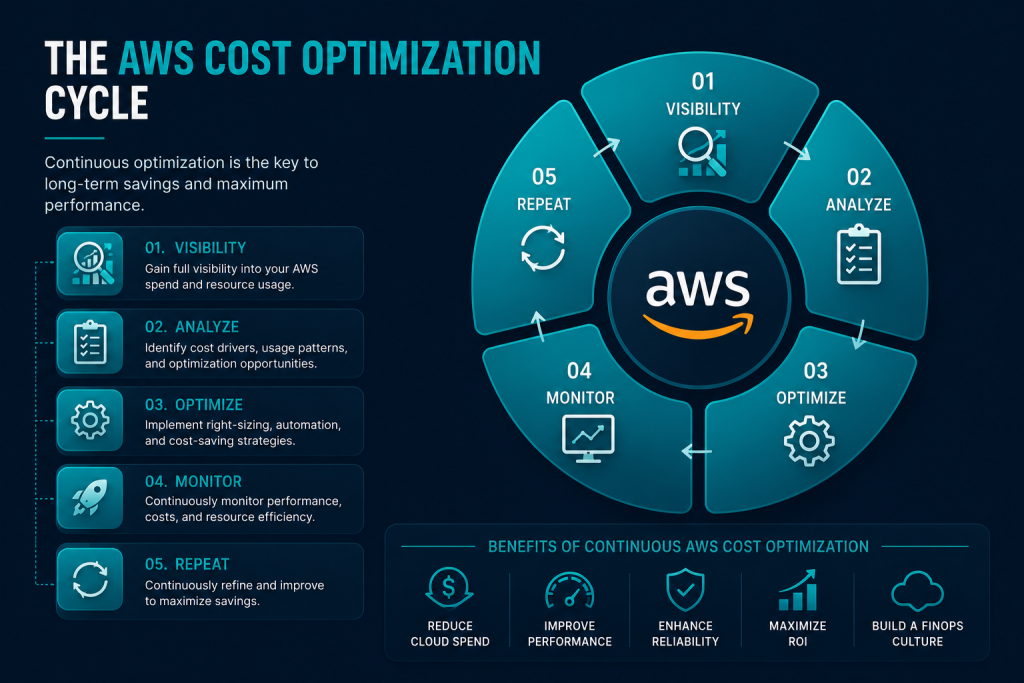
Effective AWS cost management is not a one-time project—it is an ongoing operational discipline.
Successful organizations combine governance, automation, monitoring, and engineering best practices.
1. Implement Resource Tagging
Resource tagging is one of the foundations of cloud financial management.
Use consistent tags such as:
- Project
- Department
- Environment
- Owner
- Application
- Business Unit
- Cost Center
Proper tagging enables accurate cost allocation and simplifies reporting across teams.
2. Separate Production and Development Environments
Development environments often consume unnecessary resources outside business hours.
Schedule non-production workloads to:
- Shut down overnight
- Stop on weekends
- Restart automatically during working hours
This simple automation can significantly reduce compute costs.
3. Monitor Idle Resources
Unused infrastructure silently increases cloud bills.
Regularly review:
- Idle EC2 instances
- Detached EBS volumes
- Unused snapshots
- Elastic IP addresses
- Inactive Load Balancers
- Forgotten NAT Gateways
Deleting unused resources immediately frees up budget for higher-value initiatives.
4. Right-Size Infrastructure
Many organizations provision infrastructure for peak demand but never scale it back.
Review utilization metrics regularly to identify:
- Overpowered EC2 instances
- Oversized databases
- Excessive storage allocation
- Underutilized Kubernetes nodes
Rightsizing is often the fastest way to achieve measurable AWS cost reduction.
5. Automate Scaling
Instead of provisioning infrastructure for maximum traffic 24/7, implement Auto Scaling policies.
Benefits include:
- Lower compute costs
- Better resource utilization
- Improved application performance
- Reduced operational overhead
Automation ensures infrastructure grows only when demand increases.
6. Optimize Storage Lifecycle
Not all data requires premium storage.
Automatically move older objects to lower-cost storage classes using lifecycle rules.
Examples include:
- S3 Standard
- Intelligent-Tiering
- Standard-IA
- Glacier Instant Retrieval
- Glacier Flexible Retrieval
- Glacier Deep Archive
Storage lifecycle automation is one of the easiest long-term optimization wins.
7. Use Savings Plans Strategically
Savings Plans reduce compute costs while offering more flexibility than Reserved Instances.
Review utilization regularly to ensure commitments align with actual workloads.
8. Monitor Data Transfer
Many organizations focus on compute while overlooking networking costs.
Review:
- Cross-region traffic
- Internet egress
- NAT Gateway usage
- Load Balancer traffic
- CloudFront caching efficiency
Reducing unnecessary data movement can substantially lower monthly expenses.
AWS Cost Optimization Tools
Although AWS provides excellent native services, many organizations supplement them with specialized AWS cost optimization tools.
Third-party platforms often provide:
- Multi-cloud visibility
- Kubernetes optimization
- Automated rightsizing
- Cost allocation dashboards
- Forecasting
- FinOps reporting
- Executive reporting
- Resource recommendations
Popular categories include:
Native AWS Tools
- Cost Explorer
- Compute Optimizer
- Trusted Advisor
- AWS Budgets
- Cost and Usage Report
- Cost Anomaly Detection
FinOps Platforms
Many enterprises also use dedicated FinOps platforms that provide:
- Advanced analytics
- Unit economics
- Cost allocation
- Showback and chargeback
- Optimization recommendations
- Executive dashboards
These platforms are especially valuable for organizations managing large multi-account cloud environments.
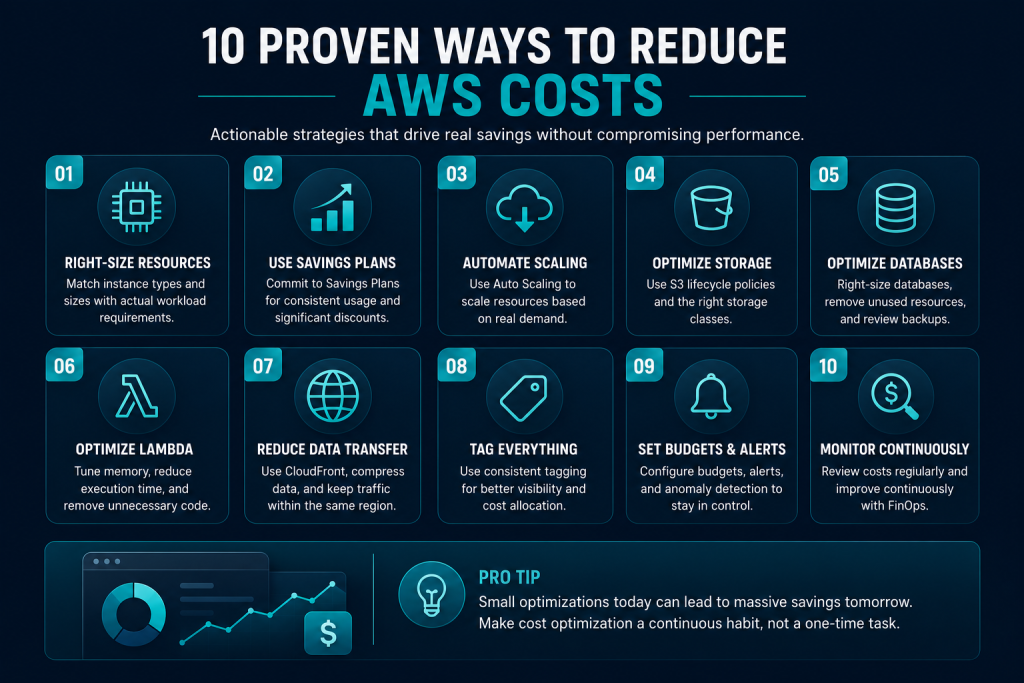
20 AWS Cost Optimization Best Practices
To build a cost-efficient AWS environment, implement the following best practices:
- Enable AWS Cost Explorer
- Configure AWS Budgets
- Use Cost Anomaly Detection
- Apply consistent resource tagging
- Right-size EC2 instances
- Purchase Savings Plans
- Use Spot Instances where appropriate
- Schedule development environments
- Optimize S3 lifecycle policies
- Archive cold data
- Remove unused EBS volumes
- Delete obsolete snapshots
- Review Trusted Advisor regularly
- Use Compute Optimizer recommendations
- Enable Auto Scaling
- Optimize database sizing
- Monitor network transfer costs
- Consolidate AWS accounts with AWS Organizations
- Review monthly Cost and Usage Reports
- Conduct quarterly cloud cost audits
Common AWS Cost Optimization Mistakes
Many businesses continue paying more than necessary because they overlook common operational issues.
Avoid these mistakes:
- Treating cost optimization as a one-time task
- Ignoring resource tagging
- Leaving development servers running continuously
- Purchasing Reserved Instances without usage analysis
- Forgetting unused storage volumes
- Overprovisioning compute resources
- Failing to monitor network costs
- Not reviewing monthly billing reports
- Allowing multiple teams to provision resources without governance
- Ignoring FinOps collaboration between engineering and finance
Recognizing these pitfalls early helps build a sustainable, cost-aware cloud culture.
Building a FinOps Culture
Technology alone cannot optimize cloud costs.
Organizations that consistently reduce AWS spending adopt FinOps, a collaborative operating model that brings together engineering, finance, operations, and leadership.
A mature FinOps practice focuses on:
- Cost visibility
- Shared accountability
- Continuous optimization
- Business value measurement
- Data-driven decision-making
- Forecasting and budgeting
When engineering teams understand the financial impact of architectural decisions, cloud optimization becomes part of the development lifecycle rather than an afterthought.
By combining AWS Billing and Cost Management tools with disciplined governance, automation, and FinOps practices, organizations can achieve long-term cloud cost efficiency while maintaining scalability, reliability, and performance.
Real-World AWS Cost Optimization Examples
Understanding AWS pricing is important, but seeing how optimization works in real-world scenarios makes it easier to identify opportunities within your own cloud environment.
Below are examples of common optimization initiatives that organizations implement to reduce AWS costs while maintaining application performance and reliability.
Example 1: Optimizing EC2 Costs
Challenge
A SaaS company was running more than 120 Amazon EC2 instances continuously, even though many development and testing environments were only used during business hours.
Optimization Strategy
- Enabled Auto Scaling
- Scheduled non-production instances to stop automatically after working hours
- Right-sized underutilized instances
- Purchased Compute Savings Plans for production workloads
- Migrated supported workloads to AWS Graviton instances
Result
- Lower compute costs
- Higher EC2 utilization
- Improved resource efficiency
- More predictable monthly AWS billing
Example 2: Reducing Amazon S3 Storage Costs
Challenge
A media company stored several years of images, videos, and backups in the S3 Standard storage class.
Although much of the content was rarely accessed, it continued to incur premium storage charges.
Optimization Strategy
- Implemented S3 Lifecycle Policies
- Moved inactive objects to S3 Intelligent-Tiering
- Archived historical assets to Glacier Deep Archive
- Removed duplicate files
- Deleted incomplete multipart uploads
Result
- Reduced long-term storage costs
- Better storage management
- Minimal impact on user experience
Example 3: Lowering AWS Lambda Costs
Challenge
An eCommerce platform experienced millions of Lambda invocations each month.
The functions were overallocated with memory and included unnecessary processing logic.
Optimization Strategy
- Refactored Lambda functions
- Reduced execution time
- Optimized memory allocation
- Removed unnecessary logging
- Used ARM-based execution where supported
Result
- Lower Lambda execution costs
- Faster response times
- Improved application efficiency
Example 4: Optimizing Amazon RDS
Challenge
A production database had been provisioned for peak demand several years earlier.
Monitoring revealed that average utilization remained well below the allocated capacity.
Optimization Strategy
- Right-sized database instances
- Optimized storage allocation
- Reviewed backup retention policies
- Removed unused read replicas
Result
- Reduced database expenses
- Maintained application performance
- Improved infrastructure utilization
AWS Cost Optimization Checklist
Before reviewing your monthly AWS invoice, use this checklist to identify opportunities for cost reduction.
Compute
- Right-size EC2 instances
- Remove idle instances
- Purchase Savings Plans
- Use Spot Instances where appropriate
- Enable Auto Scaling
- Schedule development servers
Storage
- Enable S3 Lifecycle Policies
- Archive cold data
- Delete obsolete snapshots
- Remove unattached EBS volumes
- Compress large datasets
- Review replication settings
Databases
- Right-size RDS instances
- Optimize Aurora clusters
- Remove unused databases
- Review storage allocation
- Delete unnecessary backups
Networking
- Reduce internet data transfer
- Optimize CloudFront caching
- Review NAT Gateway usage
- Remove unused Elastic IP addresses
- Monitor Route 53 query volume
Governance
- Apply resource tags
- Configure AWS Budgets
- Monitor Cost Explorer
- Enable Cost Anomaly Detection
- Review Trusted Advisor recommendations
- Perform quarterly cost audits
Following this checklist regularly helps establish a culture of continuous AWS cost optimization rather than reacting only after monthly bills arrive.
How to Build an AWS Cost Optimization Strategy
Reducing AWS costs is not about making isolated changes. Organizations that consistently control cloud spending follow a structured optimization strategy that combines governance, automation, monitoring, and continuous improvement.
A practical framework includes:
Step 1: Understand Current Cloud Spending
Begin by identifying where your cloud budget is being spent.
Use:
- AWS Cost Explorer
- AWS Cost and Usage Reports
- AWS Budgets
- AWS Billing Dashboard
Analyze spending by:
- AWS service
- Application
- Team
- Environment
- Business unit
Step 2: Identify Optimization Opportunities
Review:
- Idle compute resources
- Oversized EC2 instances
- Underutilized databases
- Cold storage
- Network transfer costs
- Snapshot usage
Prioritize changes that provide the highest savings with the lowest operational risk.
Step 3: Implement Automation
Automation reduces human error while maintaining efficient resource utilization.
Examples include:
- Auto Scaling
- Scheduled instance shutdown
- Lifecycle policies
- Automated tagging
- Infrastructure as Code
- Continuous compliance checks
Step 4: Establish Governance
Cloud governance ensures optimization continues as infrastructure grows.
Key practices include:
- Resource ownership
- Mandatory tagging policies
- Budget approvals
- Monthly optimization reviews
- FinOps reporting
- Executive dashboards
Step 5: Measure Business Value
The objective isn’t simply to reduce cloud spending.
Measure success using metrics such as:
- Cost per customer
- Cost per transaction
- Cost per workload
- Infrastructure utilization
- Application performance
- Return on cloud investment
Optimization should improve both financial efficiency and business outcomes.
Frequently Asked Questions
What is AWS cost optimization?
AWS cost optimization is the continuous process of reducing unnecessary cloud expenses while maintaining application performance, availability, scalability, and security. It combines architecture improvements, rightsizing, automation, governance, and financial management to maximize the value of cloud spending.
What is the AWS Cost Calculator?
The AWS Cost Calculator (AWS Pricing Calculator) is an official planning tool that estimates the expected monthly cost of AWS infrastructure before deployment. It allows organizations to model services such as Amazon EC2, Amazon S3, Amazon RDS, AWS Lambda, and networking components based on anticipated usage.
How much does AWS cost per month?
There is no fixed monthly AWS price. Costs depend on the services used, resource utilization, storage requirements, networking, region, and pricing model. A small static website may cost only a few dollars each month, while enterprise applications can incur significantly higher monthly expenses.
What are the best AWS cost optimization tools?
Common AWS-native cost optimization tools include:
- AWS Cost Explorer
- AWS Budgets
- AWS Cost and Usage Reports
- AWS Compute Optimizer
- AWS Trusted Advisor
- AWS Cost Anomaly Detection
Many organizations also use dedicated FinOps platforms for advanced reporting, governance, and optimization.
Which AWS service usually costs the most?
For most organizations, Amazon EC2 is the largest contributor to cloud spending. However, Amazon RDS, Amazon Aurora, Amazon S3, networking services, and data transfer charges can also represent a significant portion of the monthly bill depending on the workload.
How often should AWS costs be reviewed?
Cloud costs should be monitored continuously. Most organizations perform weekly operational reviews, monthly financial reviews, and quarterly architecture assessments to ensure resources remain aligned with business requirements.
Conclusion
AWS provides one of the most comprehensive cloud platforms available, but its flexibility can also make costs difficult to control without a structured approach.
Successful AWS cost optimization is built on three principles:
- Visibility: Understand where every dollar is spent using AWS Billing and Cost Management tools.
- Efficiency: Optimize compute, storage, databases, and networking through rightsizing, automation, and appropriate pricing models.
- Continuous Improvement: Adopt FinOps practices, monitor usage regularly, and refine your cloud architecture as business needs evolve.
Whether you’re managing a startup application or a large-scale enterprise environment, optimizing AWS costs is an ongoing process—not a one-time project. By combining the AWS Pricing Calculator, Cost Explorer, governance best practices, and service-specific optimization strategies, you can reduce unnecessary cloud spending while maintaining the scalability, reliability, and performance that AWS is known for.
Cloud cost optimization is ultimately about maximizing business value from every resource you deploy. The organizations that succeed are those that treat cost as a measurable engineering metric alongside performance, security, and availability.